Obsidian 1.15 Adds Pele Diagrams and iOS Voice Capture
Obsidian 1.15 swaps in the Pele Mermaid renderer, adds iOS 26 voice capture and brings PDF export to mobile. What changes for plugin authors and iPhone users.
Obsidian 1.15 adds a faster Mermaid engine, voice capture on iPhone, PDF export on mobile, smarter lists and accent-insensitive suggestions, according to the official Obsidian post on X, and all of that is in the release. A few details change once you read the changelog itself, and one of them matters if you run plugins.
The post from @obsdmd, published Nov. 2, opens with the renderer: "Mermaid diagrams use our new rendering engine, Pele, which renders up to 500 times faster and uses your theme's colors and fonts." Its second highlight is iOS voice capture, "record and transcribe voice notes as you speak."
Obsidian's announcement of 1.15 on X (@obsdmd)
The public Desktop and Mobile 1.15 entries are dated Nov. 2, 2026. Early-access builds with the same 1.15.0 number went to Catalyst members on Oct. 22, according to the changelog.
A diagram renderer that can't run code
The biggest change is under the hood. Mermaid diagrams and charts now render with Pele, a new library that Obsidian says is "compatible with the latest Mermaid 12.1.0 syntax." Diagrams load faster, take their colors and fonts from your theme, and resize with the note width.
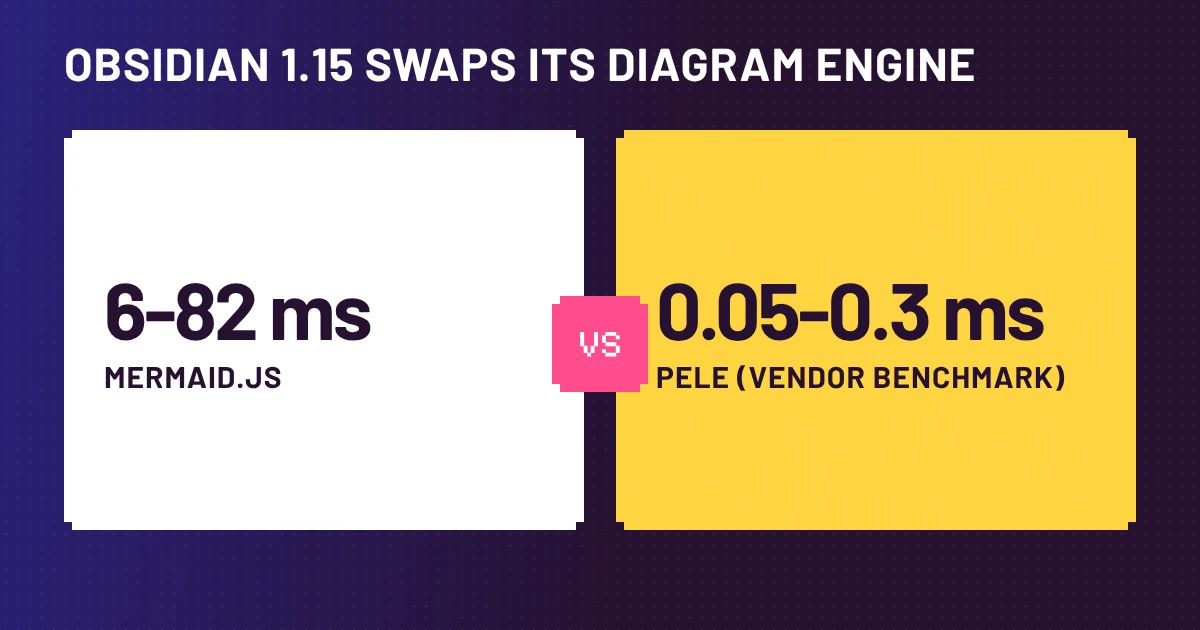
Obsidian's own post says Pele "renders up to 500 times faster." Pele's site puts numbers on it: "up to 500× faster than Mermaid.js," with render times of 0.05–0.3 ms against 6–82 ms. Those numbers come from the project's page, which doesn't say what hardware or test diagrams were used, and "up to" means a best case, not a typical one. Until someone reproduces them, they are vendor numbers.
The more practical detail is a security one. Pele can't run code, so the changelog says diagrams now show without asking first, and the "Show Mermaid diagrams in notes" setting is gone. That's a real behavior change for anyone who had turned the setting off on purpose.
What plugin authors have to fix
Obsidian no longer bundles Mermaid. Per the developer notes, loadMermaid() and window.mermaid now go through Pele, there are new --mermaid- CSS variables, and the output uses .pele- classes. A theme or plugin that styles Mermaid's old class names will quietly stop matching.
A second break is easy to miss. Closing formatting tokens now get a formatting-*-end segment in syntax-tree node names, so code that matches formatting-code_inline-code will skip the closing token. The changelog says to match formatting-code instead. And the PIXI global now loads when a graph first opens; call loadPixi() if you need it sooner.
Voice notes, with a catch
On iOS, Quick Capture can now record a voice note and transcribe it as you speak, including from the Lock Screen, and recordings can be saved to your vault. The changelog adds one condition: it requires iOS 26. Quick Capture also shows up in Spotlight actions and Siri ("Open Quick Capture in Obsidian"), and setting Note Title to Automatic uses the first 80 characters of the capture as the title.
The changelog leaves two gaps. It never says transcription works offline, and the section is headed "Voice capture on iOS" with no Android counterpart, so we couldn't find an announced Android date. If offline matters to you, test it in airplane mode before relying on it.
Smaller changes that save clicks
- PDF export: the Nov. 2 mobile entry says you can export notes to PDF on iOS and Android.
- Smart lists: with the setting on, indenting, unindenting or moving a list item up or down now takes its nested items with it.
- Accents: "cafe" now matches "café", but only in link suggestions, Quick switcher, Command palette and Bases search. The changelog doesn't say full-text search changed, so don't expect it there.
- Bases: filters can be dragged to reorder, and search warns when a result limit hides matches.
- Vim mode and startup: more Vim commands, and community plugins load faster at startup.
What to check before you update
Ten minutes covers the three places where 1.15 can bite. Open your heaviest Mermaid diagrams and compare them with your theme, since Pele is a new renderer rather than a patched Mermaid. Search any plugin or theme code for window.mermaid, the old Mermaid class names and formatting-code_inline-code. And before you lean on voice capture, record one note in airplane mode and see what happens.
Everyone else can simply update. The rest of 1.15 is small quality-of-life work, and the iOS voice feature is the one worth trying first.
Source: Obsidian changelog
Latest
- 01Vercel Security Review: What a Per-Push Scan Covers and CostsProducts · 2026-11-04
- 02FlashProve: What Anthropic's Provable Inference Speed MeasuresWorld · 2026-11-03
- 03uni-robot-agent: What Qwen3.8-Flash-Next's 31.39 Really BeatsModels · 2026-11-03
- 04LlamaIndex OCRia-1 Inference: What the 10x Speedup MeasuresModels · 2026-11-03
- 05Google Suncatcher Gemma 4 Orbit Test: What the Haiku ProvesModels · 2026-11-03